
Visa and government photos: the 50 KB field
By Tinolia
Published: Updated:
Follow the form’s framing and pixel requirements, then target its byte cap on Tinolia. Inspect the result and any missed-target warning before uploading. Files are deleted automatically after 24 hours.
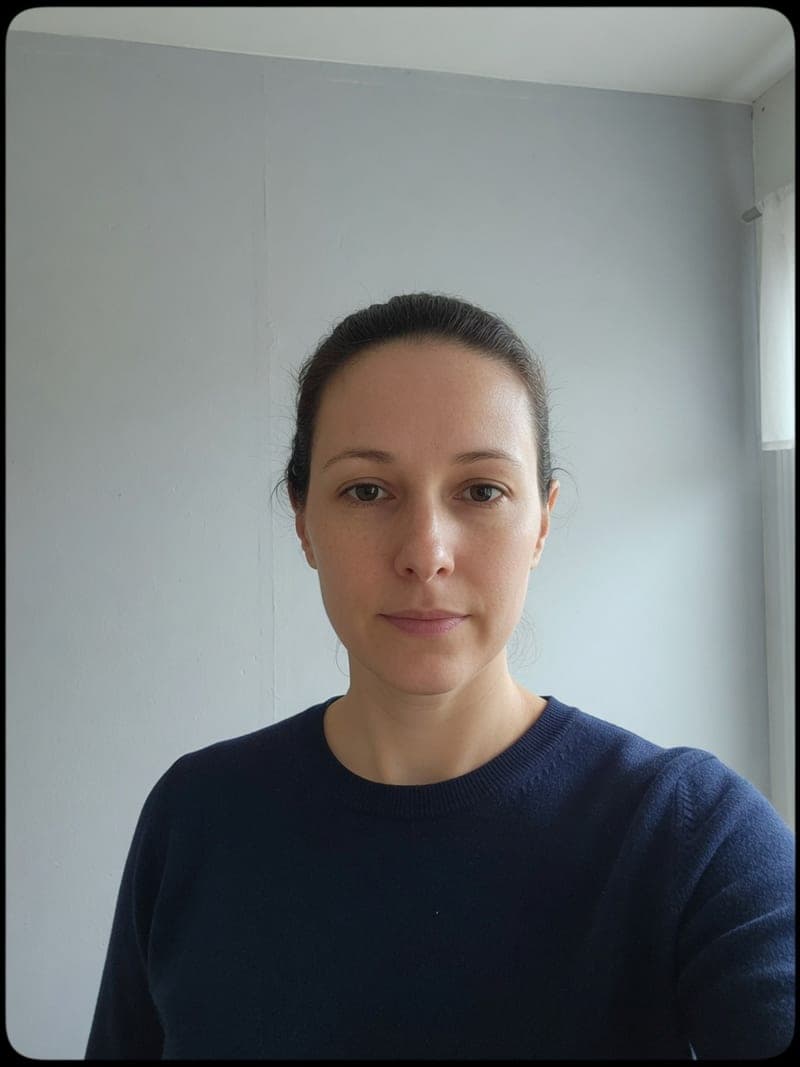 Too much wall
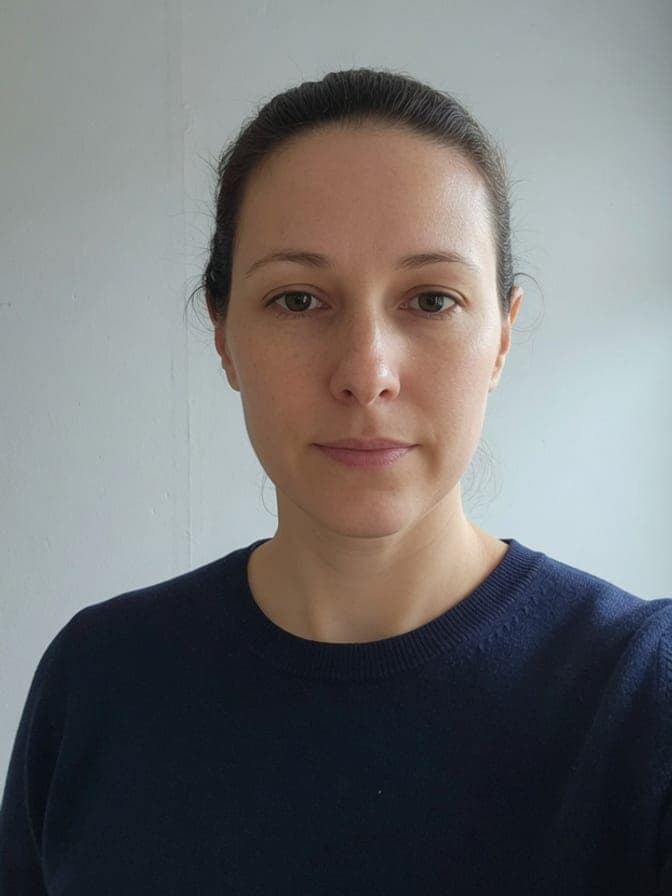 Face only
Read the number on that screen
A maximum of 50 KB is only the upper file-size limit. A range such as 20–50 KB also has a lower bound. Meeting that range does not establish that the dimensions, format or photo itself satisfy the form.
The number is not always next to the upload button. It sits in a tooltip, in an asterisk under the field, or on the instructions page you clicked past to reach the form. Read it off the screen and write it down before you touch the photo.
The US visa DS-160 digital-photo requirements specify JPEG, a square image from 600×600 to 1200×1200 pixels, and at most 240 kB. That is a maximum, not a size to aim near. Color, framing and other requirements still apply; consult the official visa-photo instructions for your application.
Crop the face before you compress
Crop according to the form’s framing instructions before reducing size. A detailed, high-resolution photo can be hard to fit into 50 KB without losing useful detail. Inspect the downloaded face at normal size; byte count alone does not establish quality.
Use Crop image on the head and shoulders. A tight crop spends every byte on the part a reviewer actually looks at, and the 50 KB that produced mud now produces a face.
Crop first, not after. Cropping a file you already compressed keeps all the damage and throws away the pixels that survived it.
Pixels first, bytes second
Most portals print two rules: a pixel size and a byte cap. Do them in that order. Set the dimensions in Resize image, then compress whatever comes out of it.
Backwards, the work goes in the bin. Compress to 50 KB and then resize, and the resizer re-encodes a file that has already lost detail, so you land under the cap with a photo that looks worse than it had to.
If no pixel size is printed, about 600 px on the long side is a sensible landing spot for a head-and-shoulders crop. Much below 300 px and the face turns into a thumbnail, which a human reviewer will notice even when the upload passes.
Then aim at the printed number
Compress to 50 KB targets the cap instead of a quality slider. It searches for an encoding at or under the number when the image allows one, and says so when it could not.
KB-target compression may reduce dimensions to meet the byte cap. Check the actual pixels and format after downloading. If both 3:4 dimensions and a byte cap are required, the optional KB target in Crop image keeps the selected portrait dimensions and warns when the cap cannot be reached.
- Crop and resize first, then drop the JPEG, PNG, WebP, HEIC, or AVIF. Up to 10 files, 20 MB each.
- Each photo is measured on its own, so a batch does not average out. Download one file, or a ZIP for several.
- If the note says the cap was missed, crop tighter or drop the width and run it again.
When the form says 100, 200, or 500 KB
Same order of operations, different ceiling. Compress to 100 KB turns up on CVs and on mail servers that bounce big attachments, Compress to 200 KB on school and exam portals, and Compress to 500 KB where the rule is loose and the detail matters.
A looser cap is also the answer when the same photo has to be printed. 50 KB is fine behind a screen and thin on a card handed over a counter.
If there is no printed number at all and you only need the file smaller, Compress image with a quality choice is the shorter road. The email side of the same problem is photos for email.
What the portal checks after the size
Size is one rule out of four or five. Once the bytes fit, the next refusal is usually the pixel dimensions: a field that wants 600 by 600 rejects a 600 by 800 crop and rarely says which of the two numbers was wrong.
Then the aspect ratio. A square field and a 3 by 4 field want different crops of the same face, and a photo stretched to fill the box reads as a different person.
Filename restrictions belong to the particular form. If its error mentions the name, try a short name such as photo.jpg and follow its documented rules. Do not assume every government or university portal rejects spaces or accents.
A plain background is on that list too, and it is not a kilobyte problem. If the form demands one, take the photo against one. Compressing a hallway selfie harder will never produce the photo a consulate asked for.
When the second attempt fails too
If a corrected file still fails, read the new error and confirm which file is selected. A stale selection, expired session or a separate requirement can cause another failure; repeating compression does not diagnose it.
Reload the page, clear the field, and pick the file again from your downloads folder rather than from the browser's recent list. Long forms also expire: an hour spent cropping can end in a session timeout that reads like a file error.
PNG can be suitable for a small, simple image, but a detailed photo may need JPEG to fit the limit. Inspect the actual result. For screenshots with text, PNG too large explains the format trade-offs; listing crops are covered in listing photo size.
- Check the downloaded size against the ceiling and against any floor.
- Confirm the extension the field accepts, usually JPG or JPEG.
- Reload the form, re-select the file, and submit before the session runs out.
Tested examples
Download the input, use the settings below and compare the result. These are public synthetic files made by Tinolia, with no customer data.
Measured on
A JPEG under 50 KB
Upload pattern.jpg to the 50 KB tool. The cap is 51,200 bytes: 50 × 1,024.
| File and format | Dimensions / pages | Bytes |
|---|---|---|
| Inputpattern.jpg | 800 × 600 px | 488,899 |
| Outputtarget-50kb.jpg | 424 × 318 px | 47,431 |


Input

Output

The output is below the cap, and the engine also reduces the pixel dimensions. A file fitting the byte limit can still fail a form with a minimum width or height. Check both conditions.
Try Compress to 50 KB with the sampleMeasurements apply to these files and settings, not to every upload. The engine version and processing environment can change the bytes. The public examples stay available; your uploads follow the 24-hour deletion policy.
Download the measurement record (JSON)Sources checked
- U.S. Department of State: Photos
Digital photo requirements for U.S. visas; other applications have their own rules.
These references support the topics listed above. Tinolia's limits and settings are checked against the tools. Service rules can change; follow the instructions for your account, app version or application.
Questions
Why is my photo still over 50 KB?
Too many pixels, or a busy PNG. Crop to the face, convert to JPEG, and try again; if 50 KB is impossible you get the smallest file plus a note.
Does a US visa photo have to be 50 KB?
The US visa digital-photo requirements specify JPEG, a square image from 600×600 to 1200×1200 pixels, and at most 240 kB. That is a maximum, not a size to aim near. Color, framing and other requirements still apply; consult the official visa-photo instructions for your application.
What if the form wants a range like 20 to 50 KB?
If the downloaded file falls below a stated minimum size, try a higher-quality export and check its bytes again. Keep the required crop and dimensions. Do not change the framing merely to make the file heavier.
Should I resize or compress first?
Set the required crop and dimensions first, then inspect the compressed result. KB-target compression can reduce pixels. For a required 3:4 portrait, the optional KB target in Crop image keeps its selected output dimensions and reports when the target cannot be reached.
Can I upload an iPhone HEIC to the portal?
HEIC is usable only if that upload accepts it. Read the allowed formats. Convert to JPEG if the instructions require JPEG, then check the resulting pixels and bytes before submission.
Will you paint a white background?
A white background is not something Tinolia adds. The crop, the pixel size, and the bytes are what change, so shoot against a plain wall if the form asks for one.
Is 50 KB enough for a printed ID photo?
50 KB does not establish print quality. Ask for the print dimensions and resolution, then provide a file that meets those requirements. Keep a higher-quality original.
More guides like this
- Reduce photo size for emailGmail personal and Outlook.com allow 25 MB in attachments. Check the recipient's limit, resize photos if suitable, then compress.
- PDF too large for GmailGmail personal and Outlook.com allow 25 MB in attachments. Compress a PDF, check its readability and follow the recipient's limit.
- Merge bank statement PDFs for a mortgageIf your lender asks for one statement PDF, merge 2–10 files in the requested order. Keep the originals and check the portal's byte and page limits.